GameStop
- 3.0
- Rating
- 500.00K
- Installs
- Free
- Price

 Analysis by App-foxy
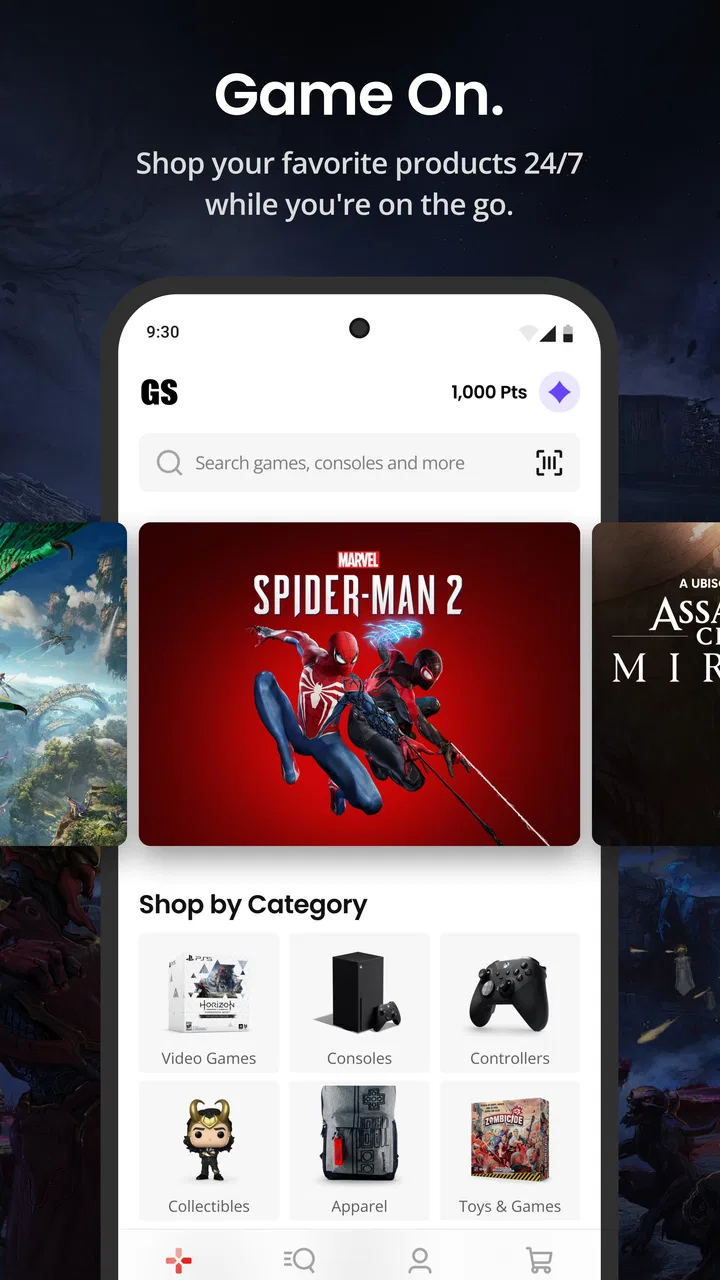
I approached GameStop as a shopping app rather than simply another way to browse games. Its purpose is straightforward: make it easier for gamers to shop from a phone, but the real question is whether that convenience feels clear and controllable when you are searching, comparing, signing in, or deciding whether to complete a purchase. After spending time with it, I found an app that makes the most sense for people who already shop at GameStop and want a mobile route to the same general retail experience.
The app is free, aimed at Everyone, and comes from GameStop App. It sits in the shopping category, not in a game library or entertainment category, so expectations matter. You are not installing it to play anything. You are installing it to browse gaming products and manage shopping tasks from a smaller screen. That distinction sounds obvious, but it helps explain both its strengths and its limitations.
What the mobile shopping experience feels like
The first thing I noticed is how task-focused the experience is. I would open it with a particular intention—looking for a game, checking whether an item was available, or deciding whether a purchase was worth making—rather than casually exploring it for long periods. That makes sense for a retailer app: the best sessions are usually short, purposeful visits.
You May Also Like

 AccuWeather: Weather Radar
AccuWeather Review: A Quick, Clear Forecast for Everyday Decisions
For everyday plans, the best forecast is the one you can understand quickly. AccuWeather makes rain timing, radar, and local conditions easy to act on, with a few trade-offs.

 Hill Climb Racing
Why Hill Climb Racing Still Turns Crashes Into One More Run
A tiny car, a bumpy hill and one more upgrade: Hill Climb Racing keeps resurfacing because its simple chaos makes every near-miss feel personal.

 AliExpress - Shopping App
AliExpress Makes Global Shopping Feel Personal, but Shoppers Bear the Risk
AliExpress turns a global marketplace into a pocket-sized discovery engine. Its reach is useful, its shopping loop compelling, and its trade-offs easy to miss.

 Lords Mobile: Kingdom Wars
Lords Mobile Is a Kingdom-Building Routine, Not a Quick Match
A case-by-case verdict on the building, battles, device demands, and social commitments that make Lords Mobile rewarding for some players and exhausting for others.

 PDF Scanner app - TapScanner
TapScanner Makes Paperwork Easier to Capture, Check, and Share
TapScanner makes scanning with a phone feel less like a rescue operation and more like a dependable step in getting work done. Its capture tools are useful, though not flawless.

 Block Blast!
 Shows How Much a Puzzle Game Can Leave Out
A quiet grid game shows why puzzle players increasingly value instant clarity, repeatable skill and low-pressure play—and where the genre still needs to catch up.
More From Our News Desk
View All News


Its store presence is substantial enough to suggest that it is not a niche experiment. The app has passed 500 thousand installs, with an average rating of 3.1 from roughly 1.8 thousand ratings. I would treat that score as a reason to keep expectations practical. It does not tell me that the app is unusable, but it does suggest that the experience may not be equally smooth for everyone, especially when a shopping session involves account access, availability checks, or checkout decisions.
I also kept the app’s release context in mind. It was released on September 22, 2025, and the current version is 501.6.8. It supports Android 7.0 and later, which is helpful if you use an older Android phone. At the same time, compatibility alone does not guarantee that every device will feel equally responsive, so I would judge it by the specific tasks I need to complete rather than by the operating-system requirement.
Where it earns a place on my phone
The strongest case for installing it is convenience. If I already know I want something from GameStop, opening a dedicated shopping app is more direct than starting with a broad web search. A focused app can reduce the number of steps between an idea—“I want this game”—and checking the relevant product information.
That is especially useful during an everyday situation such as shopping from the sofa after remembering that a new release or accessory might be available. Instead of turning on a computer, I can use the phone as the first checkpoint. I can search, inspect the result, and decide whether it is worth continuing. If I am only researching, I can stop there without treating the app as a commitment to buy.
Another useful habit is to use the app before visiting a store, not only when I am ready to place an order. A quick mobile check can help me avoid an unnecessary trip if the item I want is not available in the way I expected. I would still verify the final availability and collection details carefully before leaving home, because retail stock can change and a product page is not the same thing as a guarantee that the item will remain available.
The app is most valuable as a decision-making tool before checkout. That means browsing, comparing, checking the practical details that matter to me, and then deciding whether to buy through the app or use another route. I would not assume that installing it automatically makes every part of shopping better.
Trust starts with visible choices
For a shopping app, trust is less about flashy presentation and more about whether I understand what I am doing at each step. I pay attention to when the app asks me to sign in, when it moves from browsing toward an order, and whether the next action is clearly labeled. Those moments matter because shopping involves personal information, delivery or collection decisions, and payment choices.
I prefer to browse before creating or using an account. That lets me decide whether the app is useful without immediately handing over more information than I need for an initial search. When an app presents account access as part of a later step rather than making it feel unavoidable from the start, I feel more in control of the session.
My practical advice is to pause whenever the app changes from product discovery to transaction. Read the screen instead of tapping the most prominent button automatically. Check what the action is meant to do, whether it is adding something to a basket, beginning checkout, or confirming a choice. This is not unique to GameStop, but it is particularly important in a retailer app because a fast interface can encourage quick decisions.
I also separate three different questions that are easy to blur together: do I want the product, do I trust the purchase conditions, and do I want the app to retain an account relationship with me? The app can help with the first question, but I should answer the other two deliberately. A convenient shopping route is not a reason to ignore account controls or transaction details.
Account use without losing control
When I use a shopping app repeatedly, an account can make the experience more useful, but it also makes the account itself part of the review. I want to know why I am signing in and what I gain from doing so. If I am only checking a product, I do not want to confuse browsing with a need to maintain a persistent shopping profile.
For GameStop, I would use an account when it clearly supports a task I intend to complete, such as continuing a purchase or managing an existing shopping relationship. I would avoid entering information merely because a prompt appears early in the session. That approach gives me a simple boundary: browse first, sign in when the task genuinely requires it, and review the screen before accepting any account-related choice.
It is also worth keeping login details under personal control. I would use a unique password rather than reusing the one from an important service, and I would avoid signing in on a shared device unless I am prepared to sign out afterward. These are ordinary precautions, but they matter more when an app is connected to shopping activity.
If I stop using the app, I would remove it from my phone rather than leaving it installed indefinitely. Uninstalling is not the same as managing an account, so I would treat those as separate decisions. The app can disappear from the device while an account relationship may still exist elsewhere. That is why I prefer to review account settings and any visible choices directly instead of assuming that deleting the icon resolves everything.
Data-sensitive moments deserve a slower tap
The most sensitive part of a shopping journey is not usually the first search. It is the point where browsing becomes an identifiable transaction. That can include signing in, entering delivery information, selecting a collection or delivery option, and reviewing payment-related details. I would slow down at each of those stages and make sure the information shown matches my intention.
I also avoid granting access that does not appear necessary for the task in front of me. If the app presents a permission request, I read its wording and decide whether the benefit is clear. I do not treat a permission prompt as something that must be accepted simply to browse. If I am unsure, I would deny or postpone it and see whether the shopping task still works.
This is one of the more useful ways to evaluate a retailer app: not by assuming what it collects, but by watching the choices it actually presents. I look for understandable prompts, an obvious way to cancel or go back, and a checkout flow that lets me review rather than rush. I would not infer privacy practices from a polished interface, and I would not assume that a lack of visible friction means there is nothing worth checking.
Notifications deserve the same care. A shopping app may be useful without sending frequent alerts, so I would decide whether notifications support something I actually want to follow. If I only need occasional browsing, I would keep alerts limited or disabled where the device allows it. That keeps the app from becoming more intrusive than necessary for my use.
Useful workflows that are easy to overlook
My preferred workflow starts with a narrow search rather than scrolling through the entire catalog. I search for the exact game, console, accessory, or other item I have in mind, then inspect the result before making a decision. This reduces impulse browsing and makes it easier to notice whether I am looking at the correct edition or format.
A second workflow is to use the app for comparison, then finish elsewhere if that is more comfortable. A phone is excellent for a quick price or availability check, but a larger screen may be better when I want to read several details side by side. I do not see that as a failure of the app. It is a realistic trade-off: mobile wins for speed and portability, while a browser or desktop can be easier for careful comparison.
A third is to treat the app as a pre-visit checklist. Before heading to a physical location, I would check the item, confirm the relevant availability information shown at that moment, and save myself a wasted journey where possible. I would still avoid making a long trip based on a vague assumption. The app can inform the decision, but I remain responsible for checking the final details.
Finally, I would review the basket slowly before completing anything. This is where small misunderstandings become expensive or inconvenient. I check the item name, quantity, format, and fulfillment choice, then look for any option that changes the total or the way I receive the purchase. The app’s value is not just getting me to the basket quickly; it is helping me make a clear decision before I confirm it.
How it compares with ordinary alternatives
Compared with using a mobile browser, the dedicated app can feel more direct when GameStop is already the retailer I have chosen. I do not need to begin with a general search, and the experience is centered on shopping rather than a mixture of unrelated web results. The trade-off is that an installed app takes space, may request notifications or permissions, and creates another account or app relationship to manage.
Compared with visiting a physical store first, the app is better for preparation. I can investigate from home and decide whether a trip is worthwhile. The store is still better when I want immediate human assistance, to inspect a product in person, or to resolve a question that is difficult to answer from a product page alone.
Compared with broad marketplace apps, GameStop’s appeal is focus. A general marketplace may offer more sellers or a wider range of products, while this app is more relevant when I specifically want the GameStop shopping route. I would choose the broader alternative when price comparison across many sellers is my main goal. I would choose GameStop when retailer-specific browsing and convenience matter more than surveying the entire market.
That distinction also affects who should skip it. If I rarely shop for gaming products, do not want another app installed, or prefer comparing every possible seller before buying, a browser may be enough. If I am uncomfortable with account-based shopping or do not want to manage another set of notifications and permissions, the app may add more responsibility than value.
Who will get the most from it
I think it suits regular GameStop shoppers, people who often make purchase decisions away from a computer, and anyone who wants a dedicated place to begin checking gaming products. It is also reasonable for a parent or gift buyer who wants to research a gaming item from a phone without opening a full desktop session.
The Everyone age rating makes the app broadly approachable, but that does not remove the need for sensible shopping supervision. Younger users may still need guidance around account access, purchases, and personal information. I would not treat an age label as a substitute for a parent’s judgment about who should be allowed to complete transactions.
I would be more cautious about recommending it to someone who expects a flawless, highly personalized retail experience every time. The average rating of 3.1 indicates that the app has not satisfied every user, and shopping apps can be particularly frustrating when one important step does not behave as expected. If a purchase is urgent, expensive, or time-sensitive, I would keep a second route available rather than relying on one mobile session without checking the details.
My verdict after using it
GameStop is a sensible free shopping companion when I already know that GameStop is where I want to shop. Its main strength is not that it transforms retail; it is that it puts a focused gaming-shopping route in my pocket. I find the best value in short sessions: search for an item, inspect the relevant information, prepare for a store visit, or decide whether to continue toward checkout.
My reservations are about control and expectations rather than the basic idea. I would not install it just because every retailer needs an app. I would install it when the convenience of a dedicated GameStop experience outweighs the effort of maintaining another app, account, and set of device choices. I would also keep my attention on the transition from browsing to buying, where personal information and transaction decisions become more important.
Overall, I can recommend it to regular GameStop customers who value mobile access and are comfortable making deliberate account and privacy choices. I would point occasional shoppers toward the mobile browser first, especially if they only need a quick check. The app is useful, but its value depends on a specific habit: use it as a controlled shopping tool, not as a reason to rush through a purchase.
FAQs for GameStop
01What features does the GameStop app offer?
The GameStop app provides a comprehensive gaming experience with features like easy browsing of the latest game releases, access to exclusive deals and promotions, and the ability to track your PowerUp Rewards points. It also offers a streamlined shopping experience, including pre-ordering and purchasing games and consoles directly from your mobile device.
02Is the GameStop app free to download and use?
Yes, the GameStop app is free to download on both Android and iOS platforms. While the app itself does not require payment, purchases made through the app, such as games and gaming accessories, will incur charges. Additionally, some features may require a PowerUp Rewards membership, which has its own pricing structure.
03Can I trade in games using the GameStop app?
Yes, the GameStop app allows users to check the trade-in value of their games and electronics. While you can view trade-in offers and prepare your items through the app, the actual trade-in process must be completed in-store. The app helps you stay informed about the latest trade-in deals and values.
04How reliable is the GameStop app for purchasing new releases?
The GameStop app is generally reliable for purchasing new game releases, offering pre-order options and notifications for upcoming titles. However, availability can vary based on stock and demand. It's recommended to pre-order well in advance to secure your copy. The app also provides updates on shipping and order status.
05Does the GameStop app offer customer support?
Yes, the GameStop app includes customer support features. Users can access FAQs, contact customer service directly, and manage orders within the app. The support section helps resolve common issues and provides guidance on using app features effectively. For more complex inquiries, direct contact with a support representative is available.
Pros
- User-friendly interface for easy navigation.
- Real-time stock updates and tracking.
- Diverse product selection and categories.
- Seamless integration with reward programs.
- Frequent updates improve app performance.
Cons
- Occasional app crashes on older devices.
- Limited payment options available.
- Some features require high-speed internet.
- Notifications can be overwhelming at times.
- Certain regions face delayed shipping.

GameStop
Gallery